
Rules
Every time you add, change or delete a rule, go to Status and click Verify so the agent receives the latest version.
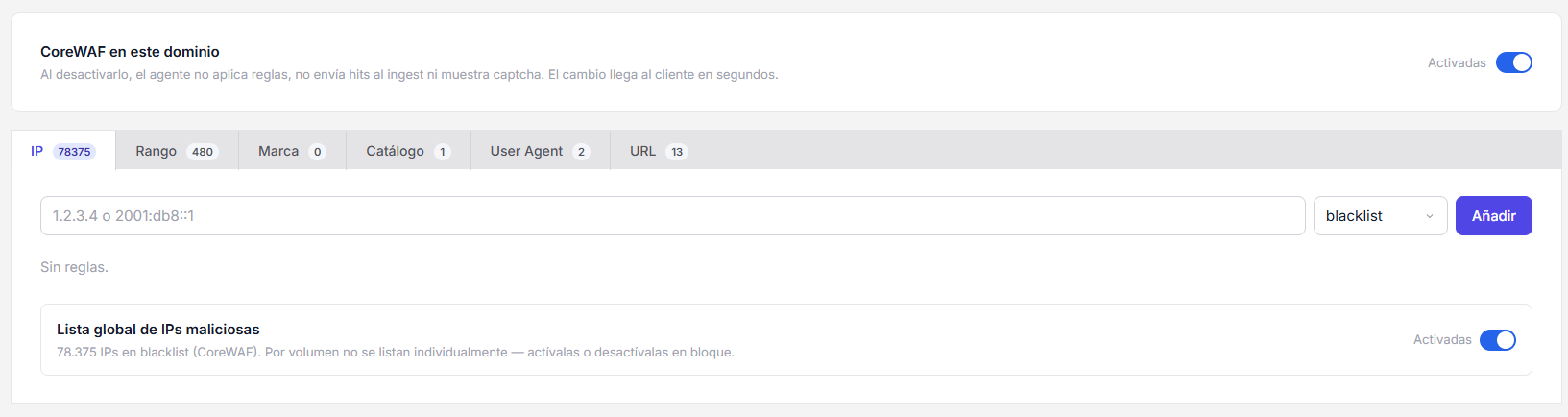
At the top of the page, in the CoreWAF on this domain section, there is a master switch. Turning it off pauses CoreWAF for that domain entirely: no rule is applied, no hits are sent and no captcha is shown. The change reaches the agent within seconds.
The Rules screen is where you decide what traffic gets blocked and what traffic always gets through. Every rule has a value (what to compare against), an action (blacklist or whitelist) and a toggle to turn it on or off.
Sections
The panel splits rules into six sections. Each one works on a different field of the request.
IP
Specific IP addresses (IPv4 or IPv6). Useful to block a single attacker or to whitelist your office IP.
Below your own list there is a global malicious IP list maintained by CoreWAF. There are too many to list one by one, so they are turned on or off in bulk with a single switch.
Range
CIDR ranges. Same as IP, but covers a whole subnet (for example 203.0.113.0/24 or an IPv6 range).
Brand
User-Agents identified by a known brand — Googlebot, Bingbot, Facebook, etc. — from the CoreWAF catalog. Use it to let legitimate crawlers through, or to block brands that bring no value to your site.
Catalog
Same as Brand, but by general category (bot, scraper, SEO tool…). Useful when you do not care about the exact brand and want to apply one policy to a whole type of traffic.
User Agent
Free-form User-Agent, written by you. Pick an operator and a value:
- contains — the header contains your text
- starts — starts with your text
- ends — ends with your text
- exact — full match
- empty — no User-Agent at all
Typical use: block curl/ or python-requests with contains.
URL
URL paths. Same operators as User Agent (minus "empty"). Useful to protect an admin panel (/wp-admin with starts), block a file that scanners hammer (xmlrpc.php with contains), etc.
blacklist vs whitelist
- blacklist — blocks the request.
- whitelist — always lets it through, no matter what other rules say.
Whitelist has absolute priority. If a request matches a whitelist rule, nothing else is evaluated.
Enable, disable and delete
Each row has a toggle. Disabling keeps the rule saved but inactive. Deleting removes it for good. The rules shipped by CoreWAF can be disabled but not deleted.